Individual Summary: everything known about one person on a page
The Individual Summary is a person's whole record, printed. It brings their facts, their parents, spouses and children, their notes and their photographs together on one page.
How to open it
Open Tree options → Reports…, choose Individual Summary under Reports for a person, and pick who it is about. If you open Reports from a person's own page, they are already chosen.
What is on it
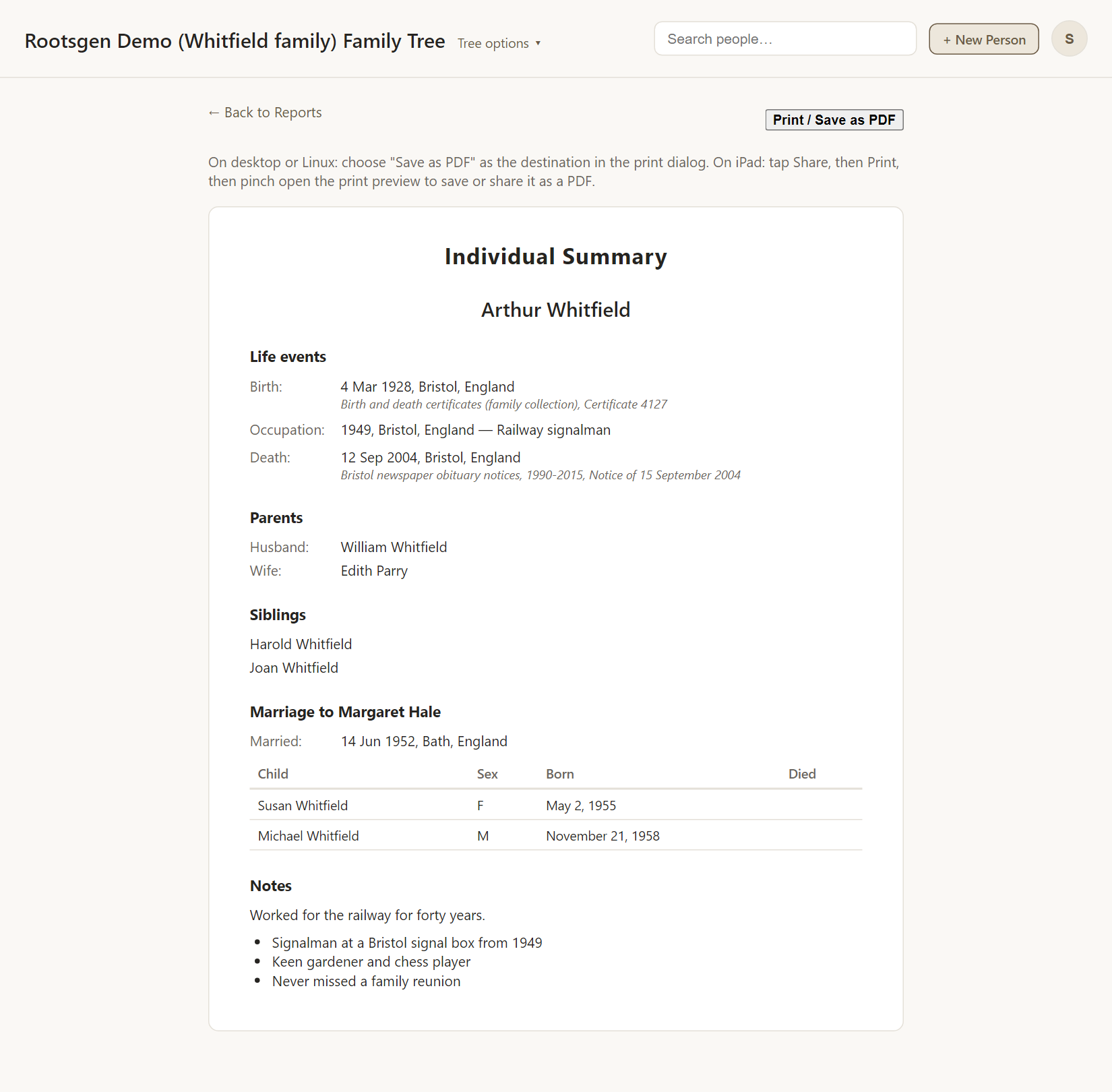
- Life events: birth, baptism, occupation, death, burial and any other recorded facts, with places.
- Family: parents, spouses and children.
- Notes, shown with their formatting.
- Photographs attached to the person.
Good uses
- A biography sheet to put behind a photograph.
- A hand-out when a relative asks "what do we know about Grandad?"
- A checklist for research: gaps in a summary show what to look for next.
Every report has a Print / Save as PDF button that uses your browser's own print dialog, so choose Save as PDF to make a file. See all reports.
Frequently asked questions
How is this different from the Timeline? The summary groups facts by kind. The Individual Timeline puts them in date order and adds relatives' events.
Are sources included? Facts are shown, not the citations. Use the bibliography report for sources.
Can I add a photo just for the report? Attach it to the person first. See photos and documents.