Individual Timeline: a person's life in date order, with age at each event
A person's life was shaped by the people around them. The Individual Timeline puts everything in date order: their own events, and the births, marriages and deaths of their close family, with their age at each one.
How to open it
Open Tree options → Reports…, choose Individual Timeline and pick the person.
What is on it
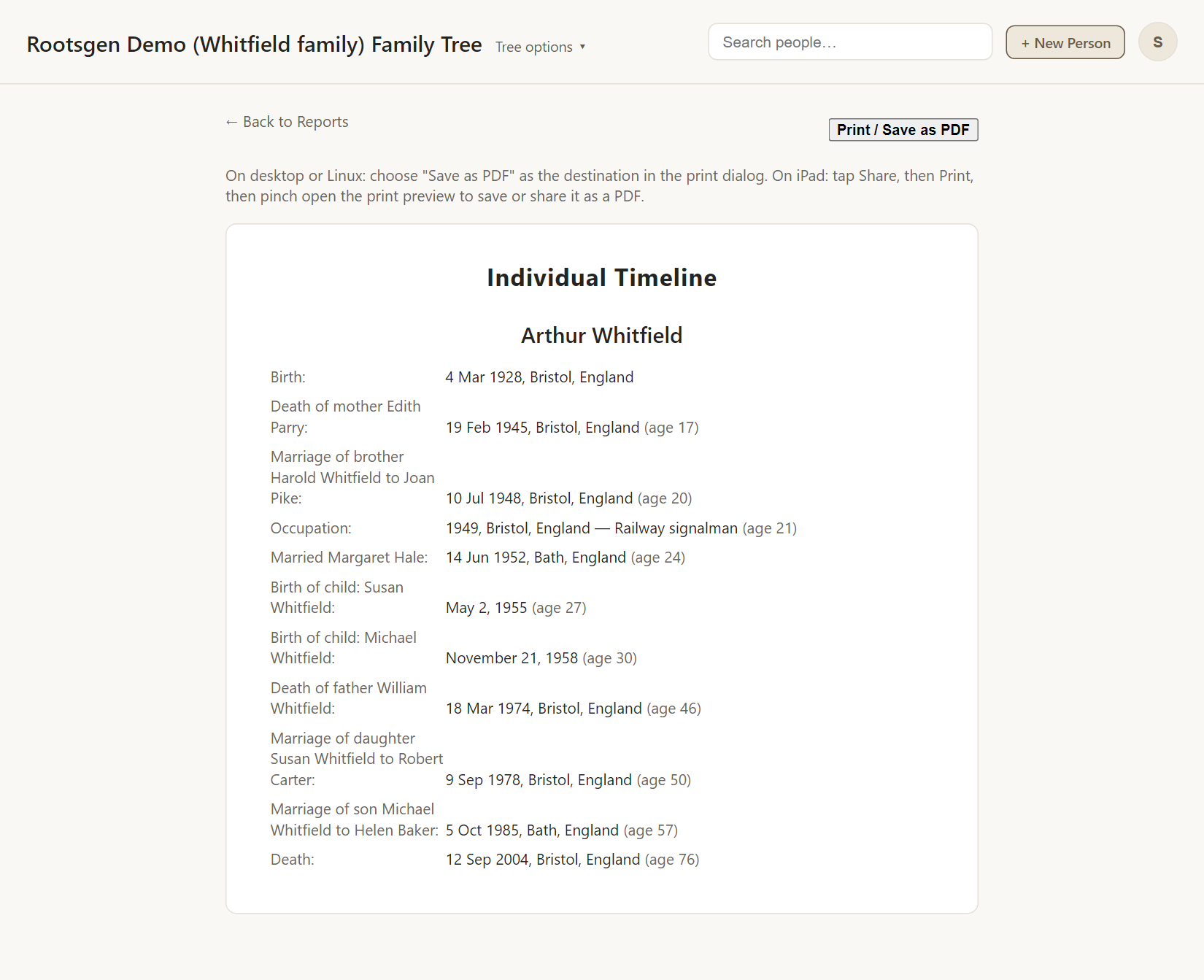
- The person's own births, baptisms, occupations, marriages and death, and any other recorded event.
- Parents' deaths, siblings' and half-siblings' marriages, children's births and marriages.
- The age at each event. An event that happened before the person was born shows no age.
- Events with no date at all appear at the end in an Undated section, so nothing is left out.
Good uses
- Understanding a life in context: "his mother died when he was 17".
- Spotting coincidences and gaps when researching.
- A more human alternative to the Individual Summary, which groups facts by kind.
Every report has a Print / Save as PDF button that uses your browser's own print dialog, so choose Save as PDF to make a file. See all reports.
Frequently asked questions
Does it need dates on everything? No. Undated events are listed separately.
Can I choose which events appear? The report shows all of them. Everything comes from the facts in your tree.
Do second marriages appear? Yes, as their own entries, in date order.