Family Group Sheet: print a couple, their marriage and their children
The Family Group Sheet is the classic genealogist's summary of a single family: a husband, a wife, their marriage, and all of their children, each with dates and places. It is the page most often shared with relatives.
How to open it
There are two ways:
- Under a couple's children list on their page, choose Print Family Group Sheet.
- Open Tree options → Reports…, pick a person under Reports for a person, and choose the family.
What is on it
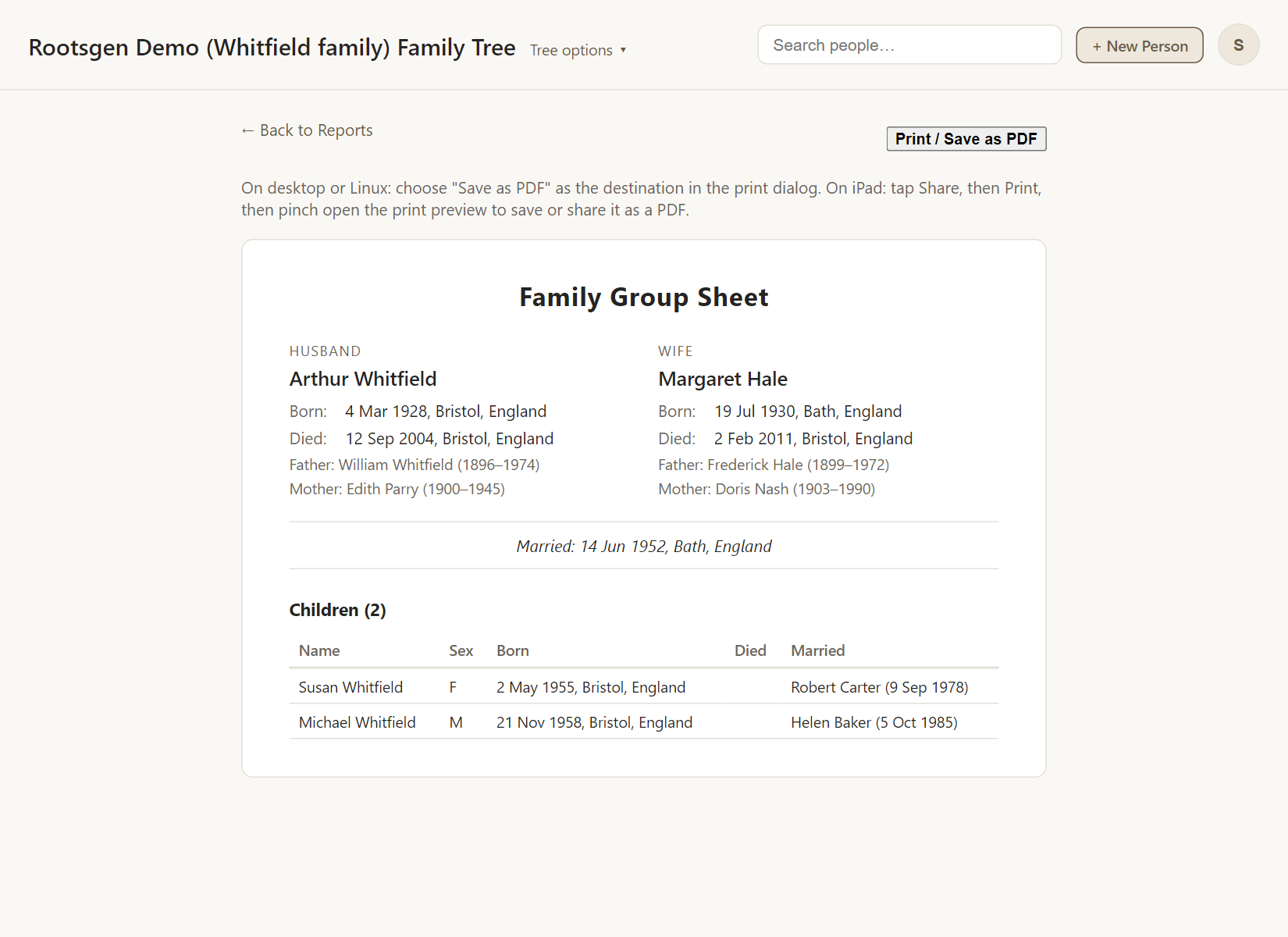
- Husband and wife, with birth, death and place details.
- The marriage date and place.
- A table of children in birth order, with their dates, and their own marriages where recorded.
Good uses
- A one-page summary to send to a cousin.
- A tidy printout for a family history file or a records office visit.
- Checking a family for gaps, since missing dates stand out on a single page.
Every report has a Print / Save as PDF button that uses your browser's own print dialog, so choose Save as PDF to make a file. See all reports.
Frequently asked questions
A person has two marriages. Which one is shown? A sheet covers one family at a time. Choose the marriage you want, and make a second sheet for the other.
Does it include sources? The sheet shows the facts. For sources, use the Source / Bibliography Report.
Can I hide living people? Reports are for people with access to the tree. To share widely, use a masked export instead.