Validate your family tree: find impossible dates, duplicates and missing files
Validate tree reads through every person, family and photo in a tree and reports things that look wrong. It never changes your data by itself, so it is safe to run as often as you like, and it is worth running after an import or a merge.
Where to find it
Open Tree options → Validate tree…. It is available to editors, co-owners and owners, the people who can act on what it finds.
What it checks
Rootsgen looks for these kinds of problems:
- Impossible dates - a death before the birth, a parent who is not older than their child, a child born after a parent had died, a marriage after a spouse's death, or a divorce before the marriage. Softer warnings flag a parent or spouse who would have been extremely young ("worth double-checking"). Dates are compared as ranges, so a year-only date is never wrongly treated as 1 January.
- Family link problems - a family with two husbands or two wives, the same person linked twice in one family, or someone listed as more than one role in the same family.
- Orphaned records - people who are not linked to any family, and family records with nobody in them.
- Duplicate-looking people - two people with the same first name and surname, born within two years of each other, and not recorded with different spouses or parents. That often means the same person was entered twice. You can also choose to show weaker matches, where the names match but a birth year is missing. Rootsgen never suggests a match between people whose recorded sex differs.
- Media still missing a file - the GEDCOM mentioned a photo or document, but the file has not been uploaded yet.
- Media attached to nobody - a real file that is not linked to any person or family.
Reading the results
Findings are grouped under a heading with a count. Each says what was found and links to the person concerned, so you can open the record and fix it.
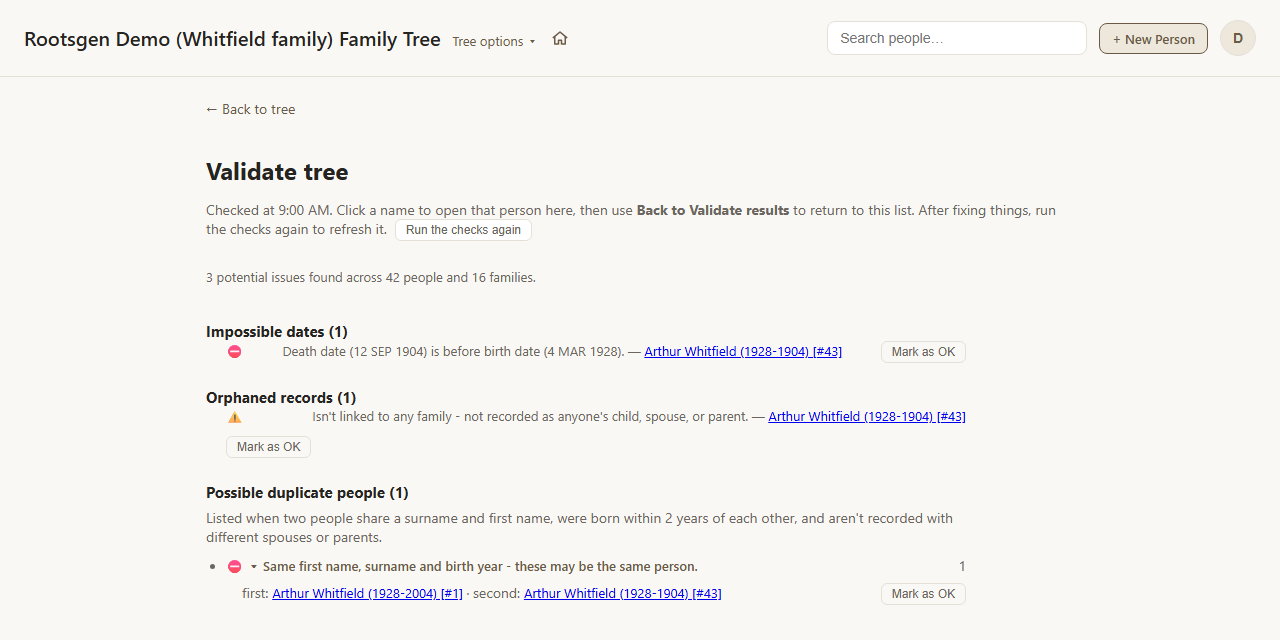
In this example one mistyped record trips three checks at once: a death date earlier than the birth, a person who is not linked to any family, and a possible duplicate of an existing person with the same name and birth year. Fixing the typo clears all three. A photo that a GEDCOM mentioned but that has not been uploaded yet would appear here as "Media still missing a file", and the fix is to run the media import again. See importing media.
Deal with each finding
- Fix it by opening the person from the link and correcting the record. Run Validate again to confirm it has gone.
- Mark as OK if you have looked and the entry is fine - a very old parent, say, or two genuinely different people who share a name. It stops appearing, and you can still see that it was reviewed.
- For a media file that belongs to nobody, you can attach it to a person, download it, or delete it permanently.
Frequently asked questions
Does Validate change or delete anything? No. The check itself is read-only. Anything that changes data, such as attaching or deleting an orphaned file, is a separate button you press deliberately.
A warning is wrong - what do I do? Choose Mark as OK. Validate flags things that are unusual, not only things that are definitely wrong.
How long does it take on a big tree? Even large trees are checked quickly, and you can carry on working while it runs.