Export your family tree as GEDCOM with photos, with living people masked
Export GEDCOM/media gives you your tree in the most portable form there is: a standard GEDCOM file, plus every photo and document under its original file name, in one zip. Use it to move to other software, share with a relative, or keep an extra copy.
Where to find it
Open Tree options → Export GEDCOM/media…. It is available to the tree's owner and co-owners.
Protect living people if you are sharing the file
Before it starts, Rootsgen asks whether to mask living people. Anyone still marked as living has their first and middle names replaced with "Living" (the surname stays), and their dates, places, notes and photos are left out. Relationships are kept, so the shape of the tree still reads correctly.
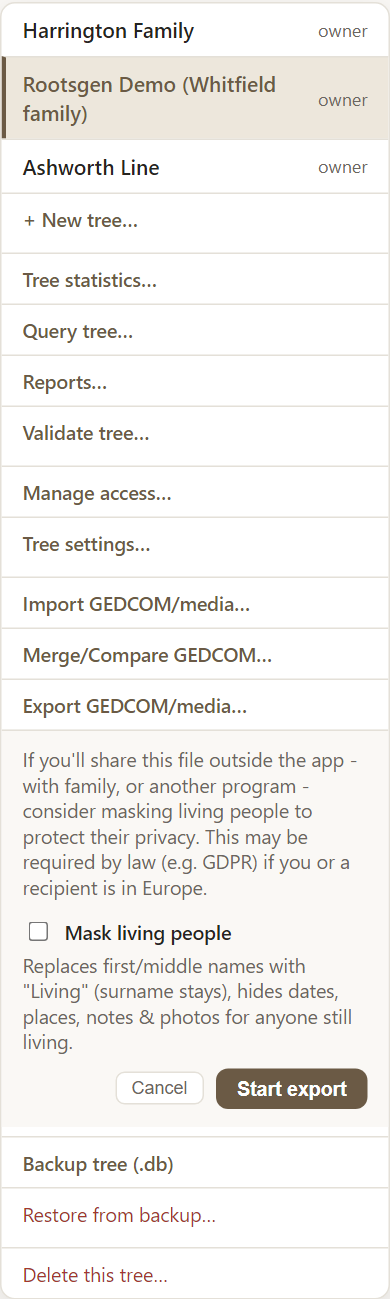
Masking is off by default and is never remembered, so you decide each time. Leave it off when the file is for your own records or to import back into Rootsgen; turn it on when it will go to someone else, or to a person in Europe where privacy law may apply.
The export runs in the background
Press Start export. The menu item shows the progress as Preparing and then Zipping with a count of files. When it is ready your browser downloads a single zip, and the item shows a "Downloaded" tick. You can carry on using Rootsgen meanwhile.

What is in the zip
- A .ged file in GEDCOM 5.5.1, readable by virtually every genealogy program.
- A media folder with your photos and documents under their original file names.
- A small face-tags file, so that face tags on your photos can be restored if you import the folder back into Rootsgen.
Files not attached to anyone are included too, so nothing is silently lost on a round trip.
An export is not a full backup
GEDCOM has no place for everything Rootsgen stores, such as saved searches and reviewed Validate notes. If you want a copy you can restore exactly, use Backup tree (.db) as well.
Frequently asked questions
Can other programs open the file? Yes. It is standard GEDCOM 5.5.1. Media are supplied as separate files under their original names.
Does an export change my tree? No. It only makes a copy.
Can editors and viewers export? The GEDCOM export is for owners and co-owners. Editors and viewers can still export search results to CSV from Query tree, with living people always masked.